
MassVisit by Mass Coms
Visitor management, from sign-in to sign-out.
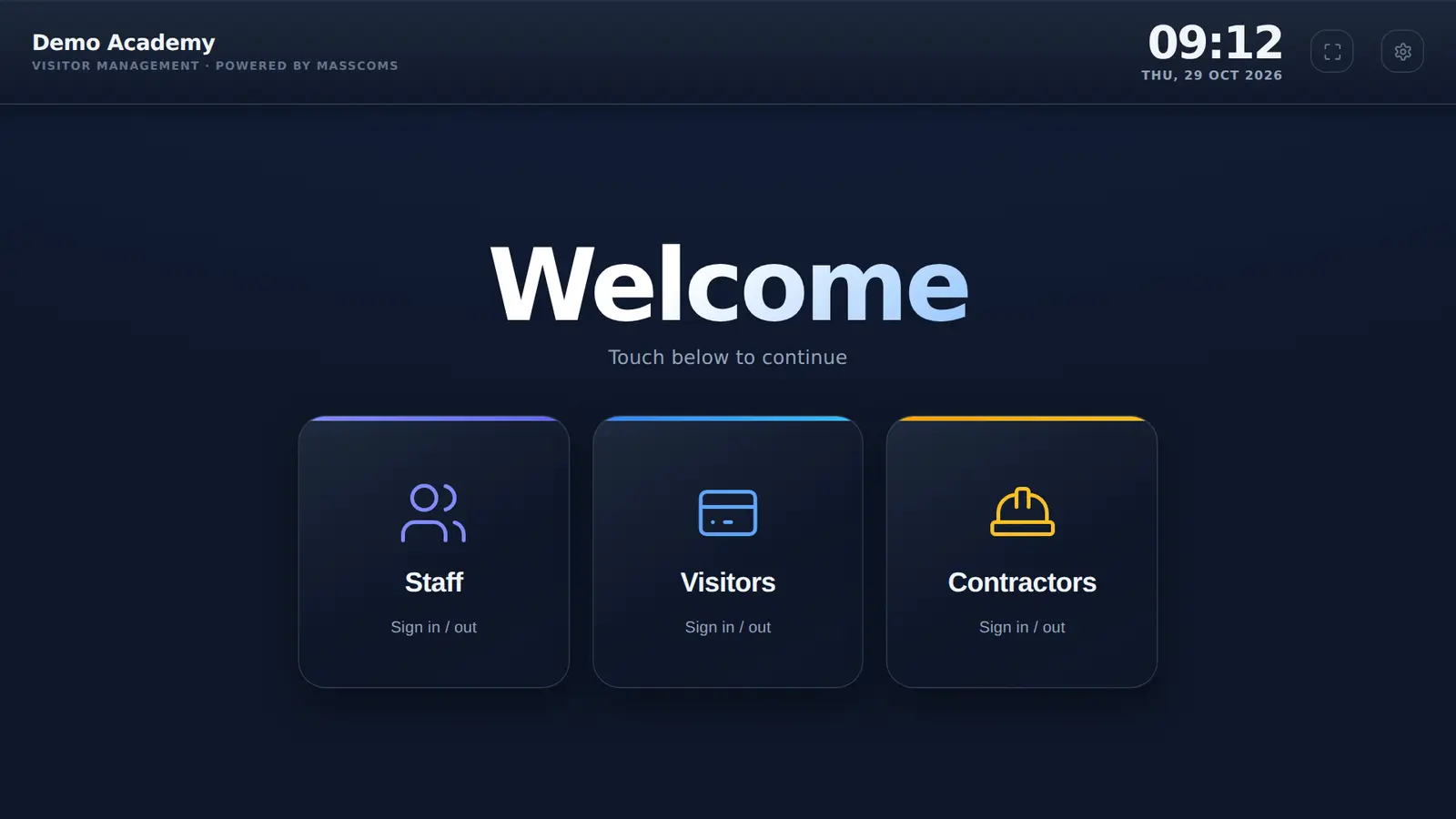
Visitors sign in on a tablet at reception and print a badge. Their host gets an email to say they have arrived. Staff tap in and out on the same screen, and everyone signs out on the way home.
- Runs on an Android tablet
- Prints to a Brother label printer
- Pre-registration with a 5-digit code
What is MassVisit?
MassVisit is visitor management from Mass Coms. Staff, visitors and contractors sign in on a tablet at reception, visitors print a badge naming who they are seeing, and hosts are emailed when their visitor arrives. Every visit is recorded with sign-in and sign-out times, and expected visitors can register ahead with a code. It also ties into Mass Coms for roll call if you ever need to evacuate.
- Who signs in
- Visitors, contractors and staff
- Badges
- Name, host, date and QR code, 86 x 60 mm
- Host told
- Email on arrival, optional
- Pre-registration
- 5-digit code, up to 30 days ahead
- Hardware
- Android tablet, Brother QL-820NWB
- Price
- First site free in year one, then £499 per site per year, 3-year minimum
- Checked
Signing in takes one short form.
Visitors tap Visitors, type their name and who they are seeing, and tick your site rules and privacy notice. The host box suggests names from your staff list as they type, so the right person hears about it.
- Phone and organisation on every form
- Car registration and reason for visit when you switch them on
- A separate route and separate rules for contractors
- Back to the welcome screen after 2 minutes without a tap
A visit, from arrival to sign-out.
What the visitor does, and what reception no longer has to.
- 01
Sign in
At the kiosk, or with a 5-digit code if they registered ahead.
- 02
Print a badge
VISITOR or CONTRACTOR, their name, who they are seeing and the date.
- 03
Host told
The person they are visiting gets an email straight away.
- 04
Sign out
On the way out they find their name on the kiosk and tap Sign Out.
Try the real kiosk in your browser.
Sign yourself in as a visitor, print a badge, use a pre-registration code and sign staff in and out. It is the MassVisit kiosk running in demo mode, so nothing you type is sent anywhere.
- The real kiosk screens, not a mock-up
- Example data for a made-up school
- Works on a phone, a tablet or a laptop
The host knows before the visitor sits down.
Switch on the arrival email and the person being visited hears about it as soon as their visitor signs in. If the name typed matches nobody on your staff list, the email goes to your reception address with a note of what was typed.
NotificationsHi Daniel,
Sarah Mitchell has signed in at reception and is waiting for you.
| Type | Visitor |
| Organisation | Northfield Catering |
| Reason | Kitchen inspection |
| Car registration | AB12 CDE |
Badges that say who someone is with.
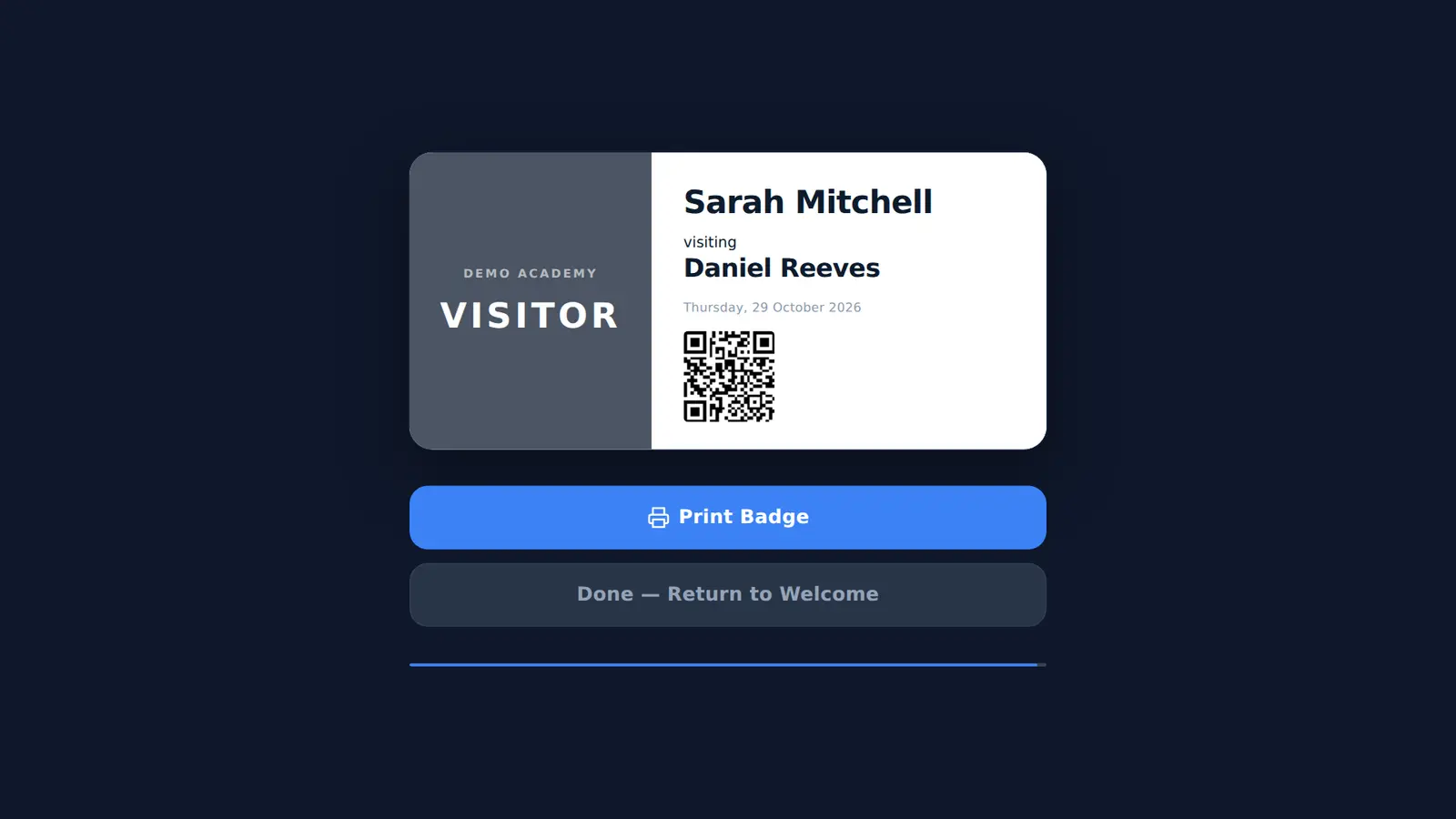
After signing in, the visitor checks their badge on screen and taps Print Badge. It goes straight to a Brother label printer on your Wi-Fi.
- VISITOR or CONTRACTOR in large type
- The host's name under the visitor's
- A QR code unique to the visit
- Reprint from the kiosk if one is lost
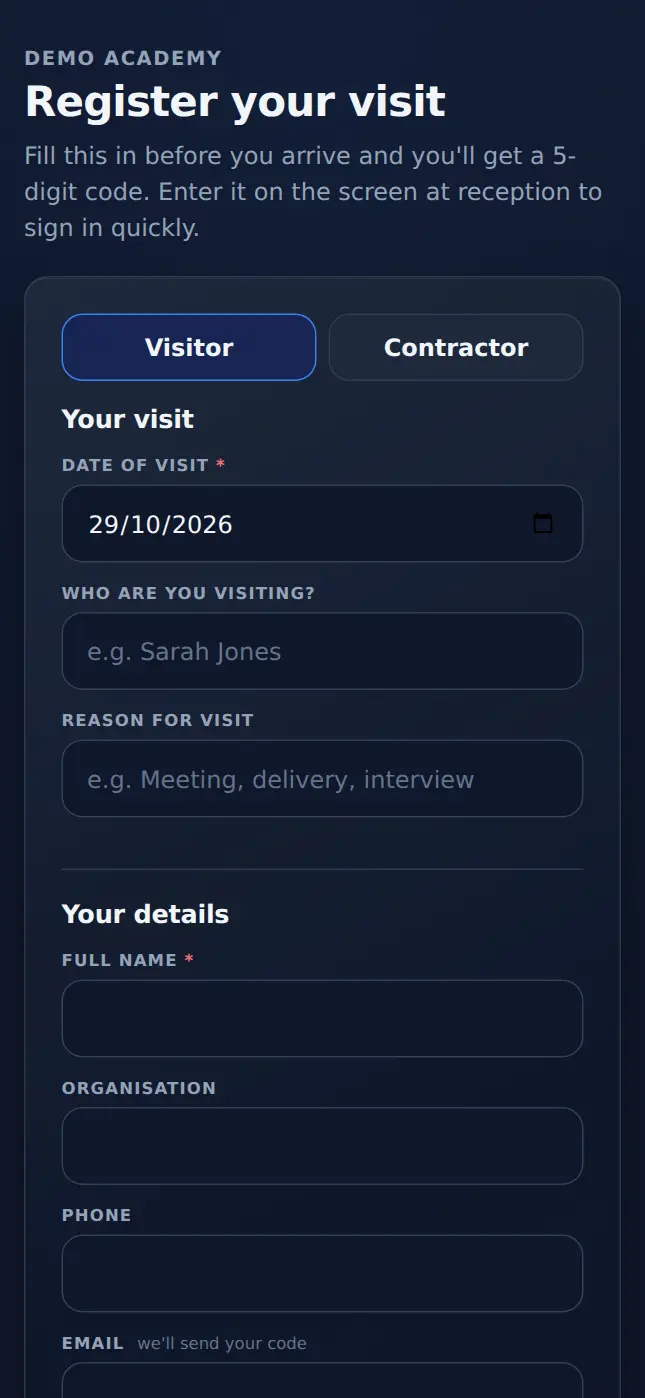
Expected visitors fill in the form at home.
Share one link with meeting invites or contractor bookings. Visitors pick a date, enter their details and accept your rules on their own phone. On the day they tap Have a code? and type five digits.
- Visit dates from today up to 30 days ahead
- Each code works once, on the visit date
- Hosts can be emailed when someone registers
Staff tap in and out on the same screen.
Every member of staff has a card with their photo or initials. One tap and a confirm signs them in or out, so the kiosk knows who works on site today as well as who is visiting.
Staff sign-in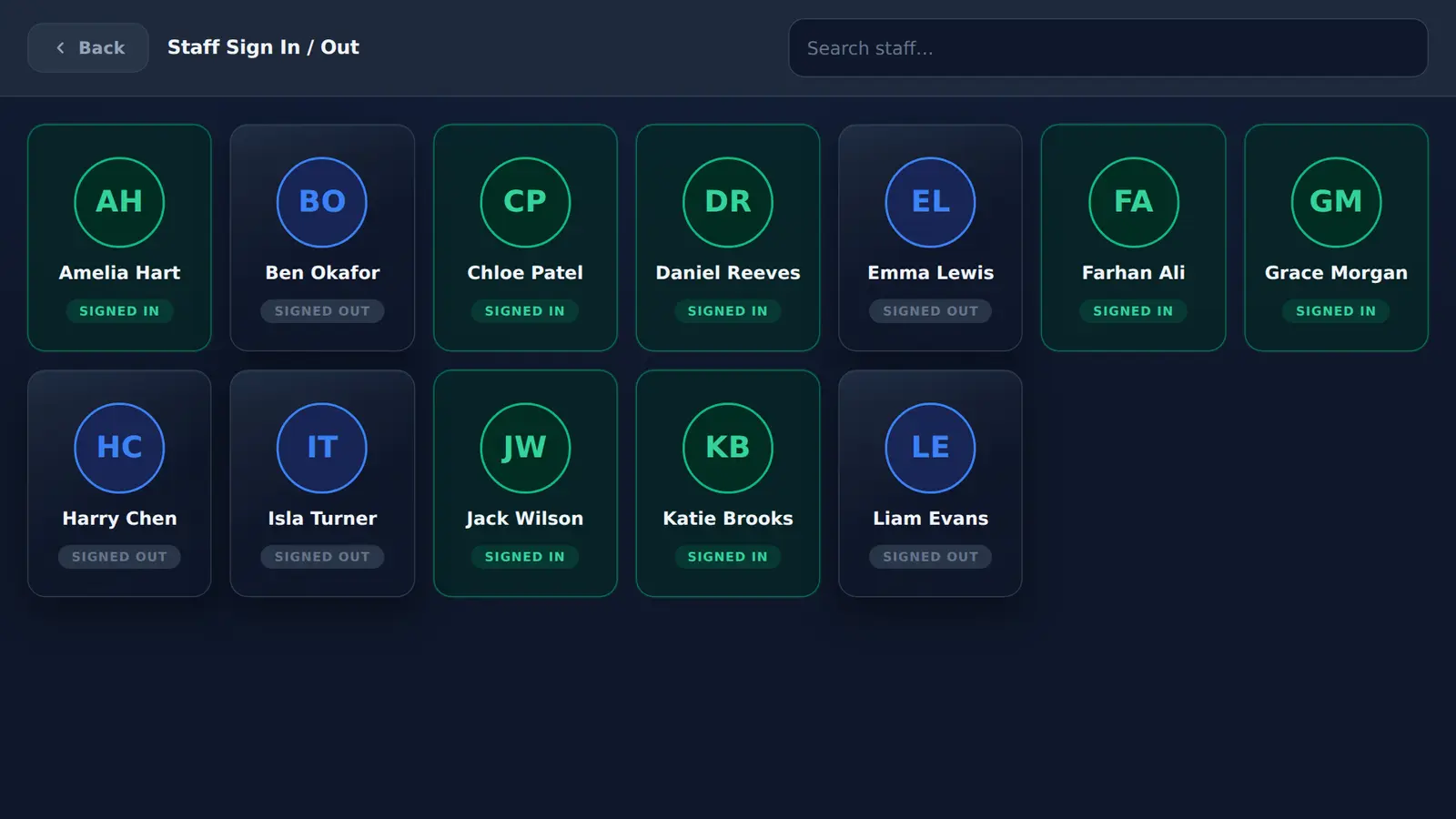
Today's visitors, at a glance.
The admin page shows who is here now. Every visit is also stored with its date and times.
- On site nowStaff, visitors and contractors, with a total for each.
- Expected todayEveryone who pre-registered for today's date.
- Stored with each visitName, organisation, host, sign-in and sign-out times.
- Also storedWhen each visitor ticked your rules and privacy notice.
- Your settingsQuestions, rules, logo, host emails and the staff list.
Four steps to a working kiosk.
No server to install and no passwords stored on the tablet.
- 01
Install
Put the MassVisit kiosk app on an Android tablet and set it as the Home app, so it starts after a restart.
- 02
Sign in once
An admin signs in with their Mass Coms account. The printer is found on the network.
- 03
Set your questions
Add your logo, staff list, rules and privacy notice. Switch on the questions you need.
- 04
Share the link
Send the pre-registration link with your next meeting invite.
How it compares.
Most sign-in apps cover the basics. A paper book covers less.
| Capability | MassVisit | Typical visitor sign-in apps | Paper visitor book |
|---|---|---|---|
| Visitor, contractor and staff sign-in | Yes | Yes | Yes |
| Printed visitor badges | Yes, with QR code | Yes | Handwritten, if at all |
| Host told when their visitor arrives | Yes | Phone call from reception | |
| Pre-registration before the visit | Yes, 5-digit code | Yes | No |
| Rules and privacy notice accepted at sign-in | Yes, time stored | Often | A line on the page |
| Sign-out time recorded | Yes | Yes | If someone remembers |
| Who is on site, passed to an emergency roll call | Yes, with Mass Coms | Separate list or export | Carried out by hand |
| Keeps working without internet | No, shows an offline page | Varies | Yes |
Category view, not a review of any single product.
Who is on site, if you ever need to evacuate.
If you have to get everyone out, the first question is who is in the building. MassVisit already knows who has signed in and not signed out.
Because MassVisit is part of Mass Coms, a UK emergency communications platform, that list can go straight to the people doing the roll call, and the reception tablet can show the instructions. It is a starting list: people forget to sign out, so staff still check it at the assembly point.
How the roll call link worksBuilt for the places people visit.
The kiosk is the same everywhere. What changes is who signs in and what you ask them.
Your first site is free for year one.
On a 3-year sign-up. After that, and for every additional site, it is £499 per site per year, however many visitors you have.
First site, year one
£0
One site over the 3 years: £0 + £499 + £499 = £998.
Every other site-year
£499 per site / year
Two campuses two miles apart are two sites: £499 in year one, then £998 a year. £2,495 over 3 years.
MassVisit is part of the Mass Coms platform, which has its own annual fee and a £299 setup fee. Tablets and printers are not included. Full pricing
Questions people ask first.
Every question answeredWhat is MassVisit?
MassVisit is visitor management from Mass Coms. Staff, visitors and contractors sign in on a tablet at reception, visitors print a badge naming who they are seeing, hosts are emailed when their visitor arrives, and every visit is recorded with sign-in and sign-out times.
How do visitors sign in?
They tap Visitors on the kiosk, enter their name and who they are visiting, add a phone number and organisation if they like, and tick your site rules and privacy notice. Then they print their badge. Visitors who registered in advance type a 5-digit code instead.
Can the person being visited be told when their visitor arrives?
Yes. Switch on the arrival email and the host is emailed as soon as their visitor signs in. If the name typed matches nobody on your staff list, the email goes to your reception address instead.
What hardware does MassVisit need?
An Android tablet or touch panel running the MassVisit kiosk app (listed as MassComs Visitor Kiosk on the device), Android 5.1 or later, and a network connection. Add a Brother QL-820NWB label printer on the same Wi-Fi for printed badges.
Can visitors register before they arrive?
Yes. Share your registration link and visitors fill in their details on their own phone, up to 30 days ahead. They get a 5-digit code to type at the kiosk on the day.
How much does MassVisit cost?
On a 3-year sign-up, your first site is free in year one, then £499 a year in years two and three. Each additional site needs its own licence at £499 per site per year from year one. MassVisit is part of the Mass Coms platform, which is priced separately with setup and hardware.
Is there a minimum contract?
Yes, 3 years. The first site is free for the first year.
Does it work without the internet?
No. Signing in needs a connection. If the network drops, the kiosk app shows an offline page and keeps retrying until the connection is back, so keep a paper fallback for outages.
What happens to the visitor list if we need to evacuate?
MassVisit already knows who has signed in and not signed out. Because it is part of Mass Coms, that list can be passed to the people doing the roll call. It is a starting list, not proof: staff still check it at the assembly point.
See it at your own reception desk.
In a demo we sign a visitor in, email their host and print a badge, so you see exactly what your reception would see.